
Web dashboard · app.spectraterminal.com
The trading dashboard your performance review deserves.
Sign in to Spectra on the web and the dashboard hands you a complete review surface: equity and calendar, per-trade journal with strategy notes and screenshots, live alerts, closed-trade history, workspaces sync, custom scripts library, webhook auto-orders, plan and usage. Built on the same Supabase backend that powers the desktop terminal — every action you take on Mac, Windows, Linux, or in the browser lands here.
01 · Overview
Equity, calendar, debrief — at a glance
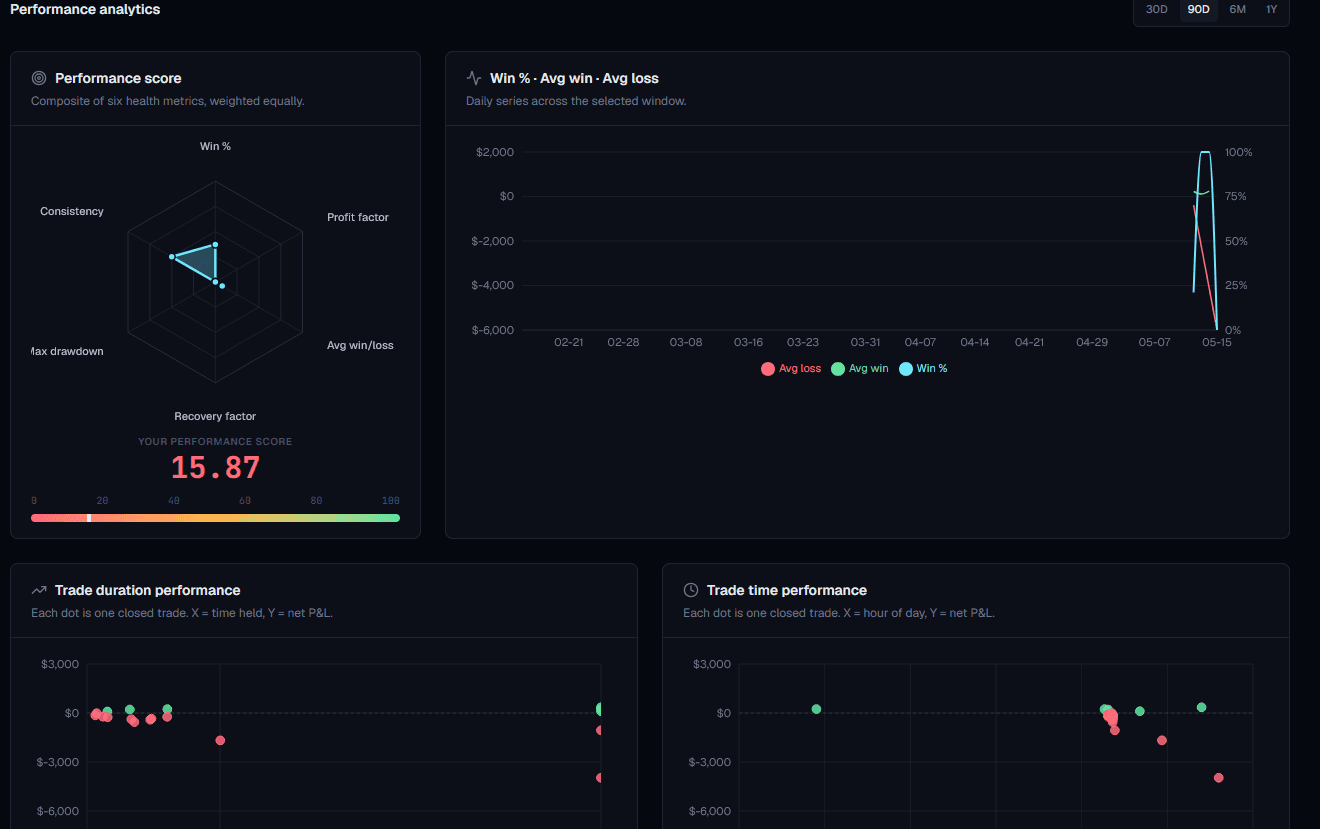
The first surface you see when you sign in. Top KPI strip (equity, realized P&L 30d, trade count, win rate) sits over a monthly trading calendar where every day is tinted bull / bear / flat by its net P&L. Tap any day for a debrief — what you took, what you skipped, what changed.
- KPI strip: equity, 30-day P&L, trade count, win rate
- Monthly trading calendar with bull/bear day tints
- Performance metrics card: cash, unrealized, exposure, avg win/loss, max drawdown
- 90-day equity curve + daily P&L bars
- Exposure by asset class (crypto / stocks / forex / commodity / index / ETF)
- Top symbols by P&L, recent trades, active alerts pills
- Tier-usage progress bars (alerts / workspaces / scripts / orders this month)
02 · Trade journal
Every paper trade, journaled like it mattered
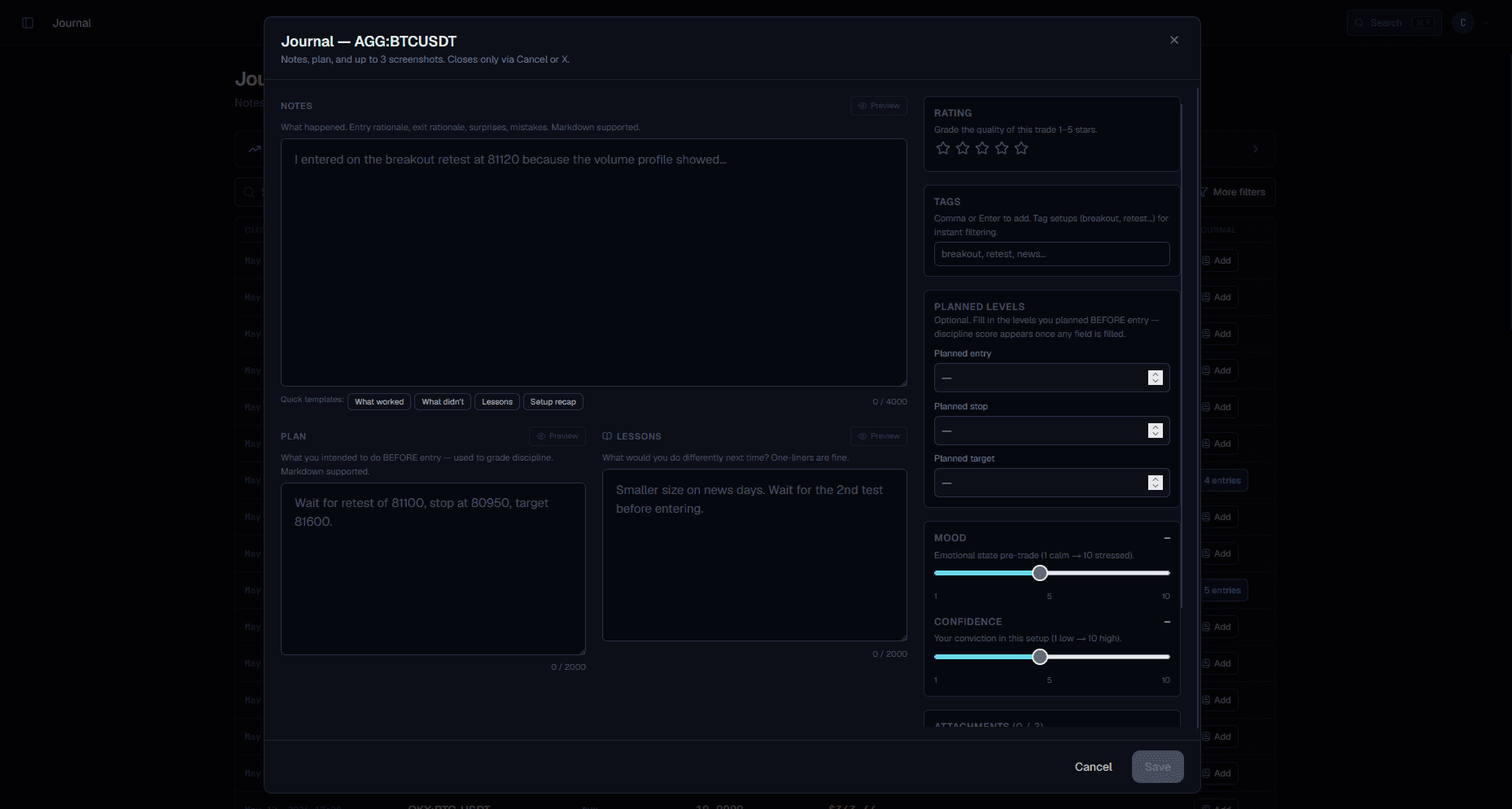
Closed trades flow into the journal automatically. Add your read — what setup you took, why you took it, what you'd change — alongside chart screenshots, mood and confidence ratings, and the planned entry / stop / target so future-you can grade past-you with hard numbers.
- Notes, plan, lesson — three free-text fields per trade
- Mood and confidence sliders (1–5) graded at trade time
- Planned entry / stop / target captured before the move
- Image attachments — drop chart screenshots straight into the entry
- Tags + rating so reviews can filter by setup family or grade
- Auto-linked to the closed-trade row, P&L, and the original chart
 BeforeAfter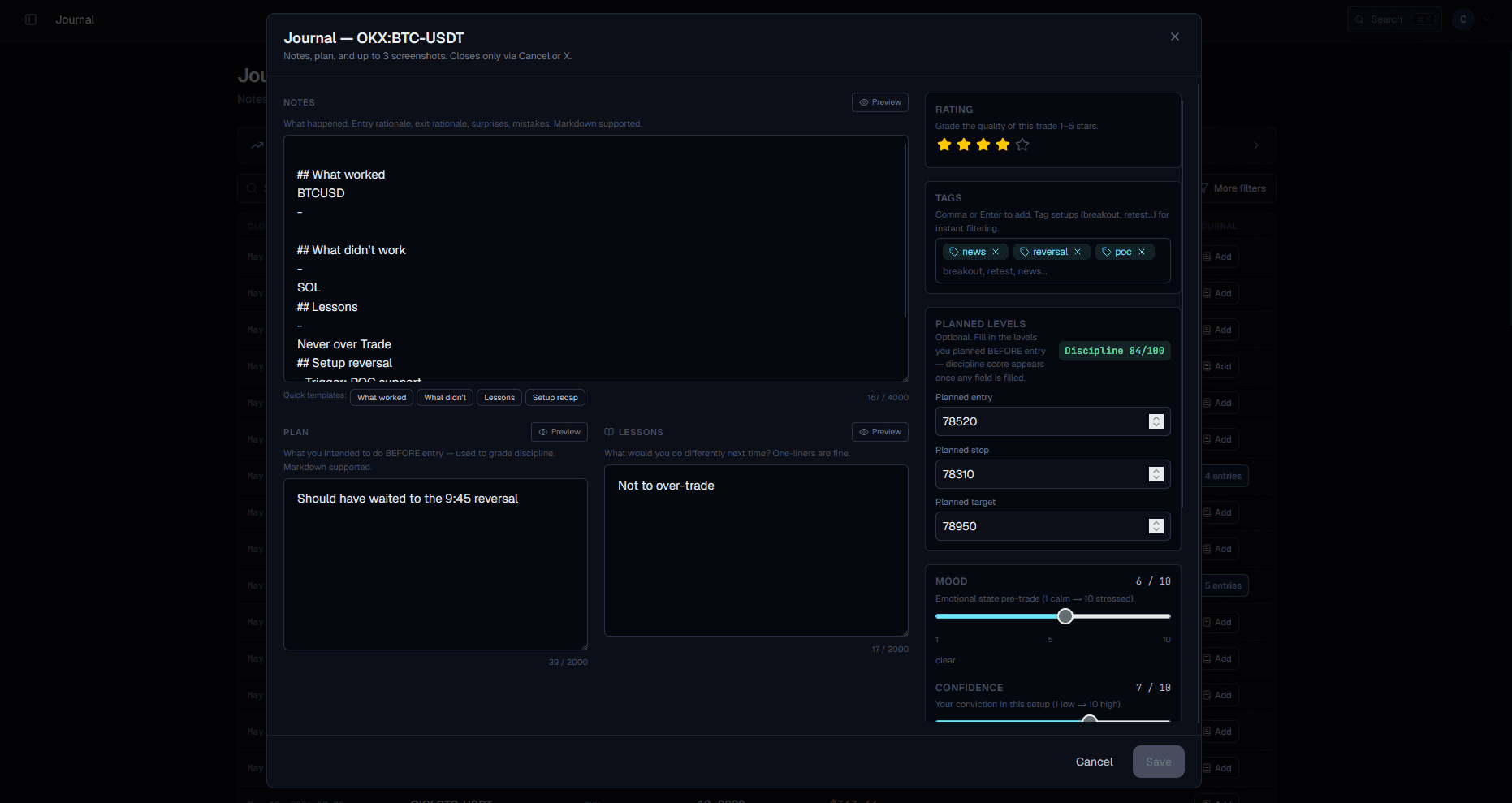
03 · Alerts
Three tabs — Active, Health, Fires — for every alert you've built
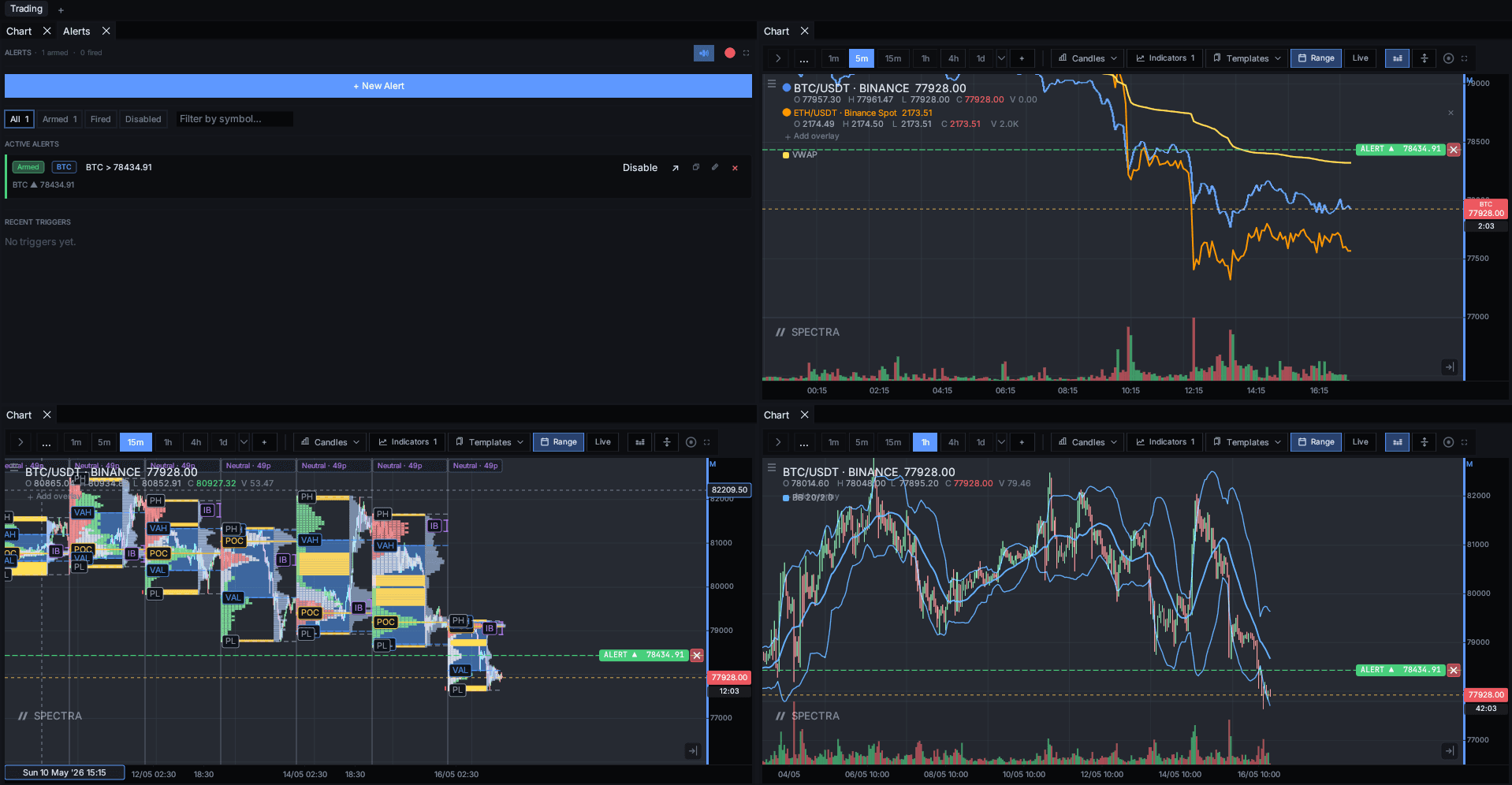
Every alert from the desktop terminal mirrors into the dashboard's three-tab alerts page. The Active tab shows everything armed with smart per-row condition summaries covering all eleven categories (price / indicator / drawing / composite / orderflow / cross-feed / position / market state / time / pattern / custom DSL), channel-routing chips, and a snooze popover. The Health tab sorts by 24h or 30d fire rate and flags Dormant / Chatty rows. The Fires tab is your rolling 30-day audit log.
- All eleven condition categories surface with smart summaries — composite, orderflow, position, time, pattern and the rest get human-readable labels.
- Per-row snooze popover: 10 min / 1 h / 4 h / 1 day. Server-honoured — the worker stops firing across every device.
- Channel-routing chips show which Discord / Telegram / webhook destinations a given alert fans out to.
- Health tab sorts by fire rate, flags Dormant (no fires in 30 d) and Chatty (>10/day) — bulk disable / enable / delete.
- 30-day fire ledger with symbol, price, message, and timestamp — exportable when you need it.
- Capacity bar against your tier's `max_alerts` cap, plus an inline `?alert=<token>` deep-link importer for shared templates.
- Notification Channels page (Discord / Telegram / generic HTTP webhook) lives next door — one-click "Send test" verifies the wire.
04 · Trades
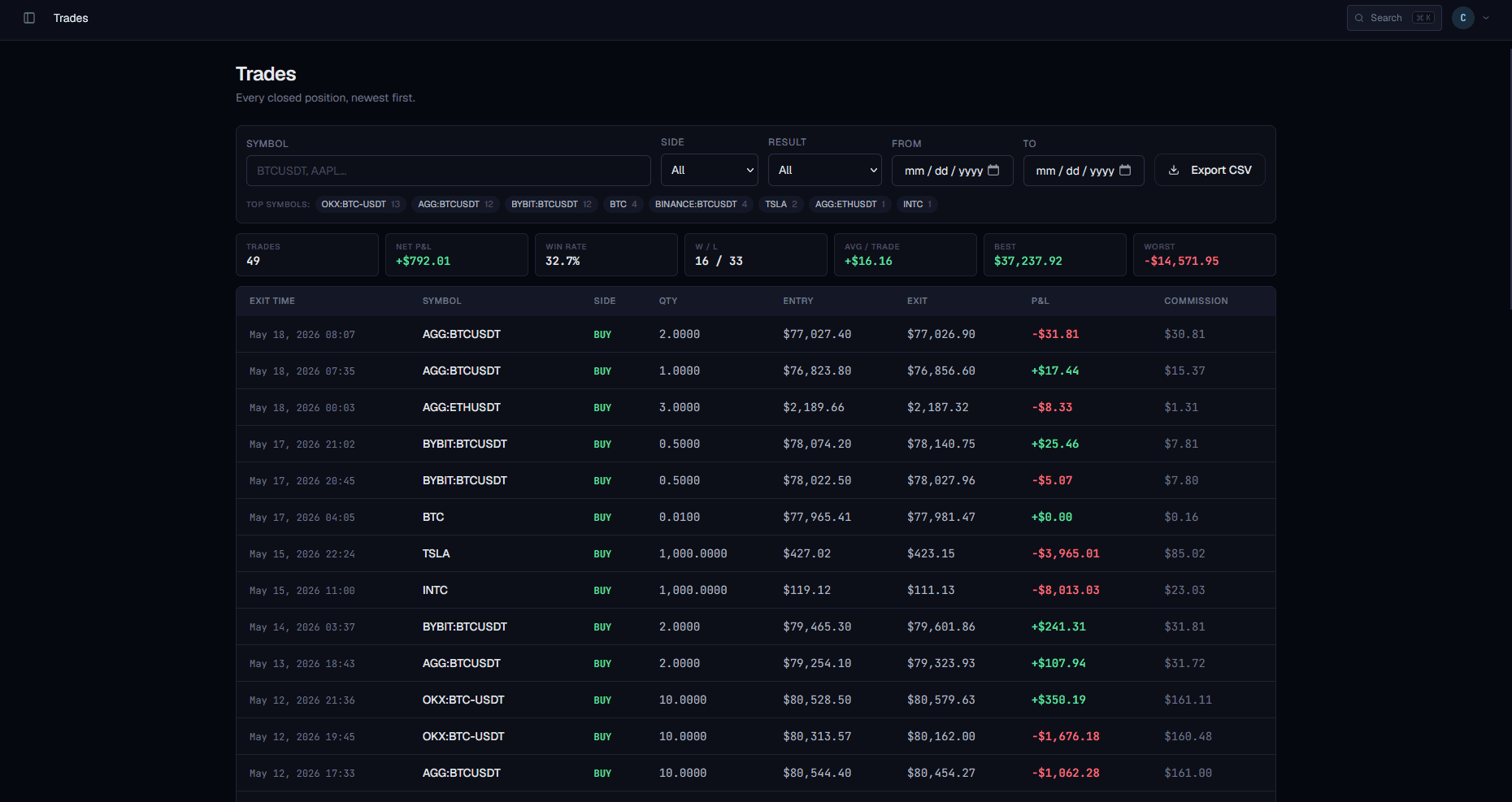
Closed-trade history with every column you need
The trades page is a sortable, filterable table of every paper trade you've closed — last 2,000 rows. Every column you'd want for a review: entry and exit times, side, quantity, prices, commission, account, P&L. Pro tier exports the table to CSV.
- Sortable columns: symbol, side, qty, entry/exit price, P&L, commission
- Per-account filtering so paper vs sim accounts stay separate
- Up to 2,000 rows in-table; older trades stay in cloud storage
- CSV export on Pro tier
- Direct journal link — open any row to see / write its journal entry
 BeforeAfter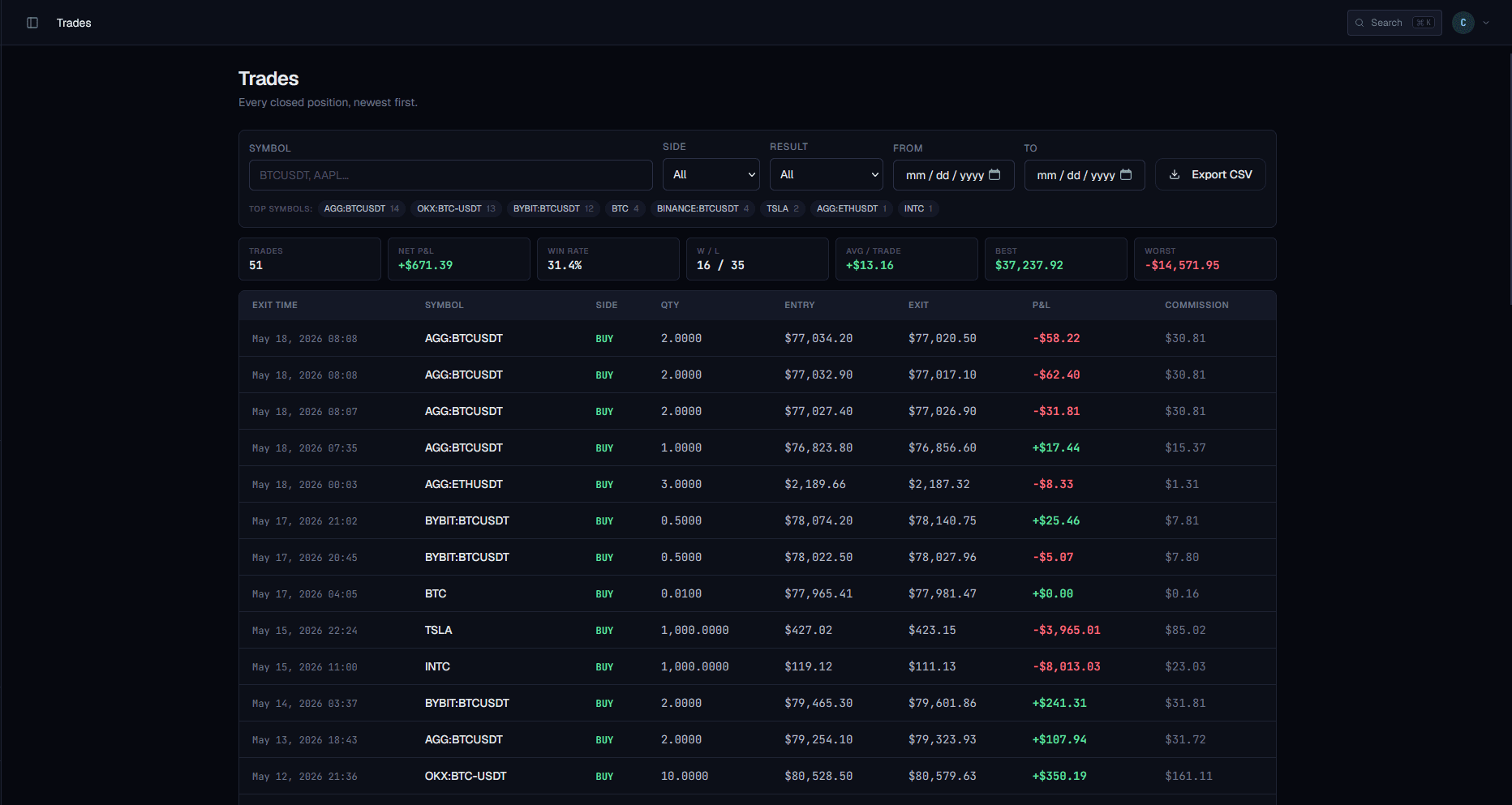
05 · Workspaces
Every saved layout, one click from the chart
Save a workspace on the desktop and it appears in the dashboard's workspaces list — same name, same dock layout, same chart settings. Pick one to open it in a fresh browser tab; the chart loads straight into it. Multi-monitor traders organise here.
- Live-synced from desktop and browser saves
- Open any workspace in a fresh tab — no reload needed
- Names, layouts, chart symbols and indicators all round-trip
- Tier-capped workspace count with a usage bar
- Restore-previous-session prompt on cold load
06 · Custom scripts
Your indicators, alerts, and strategies — managed
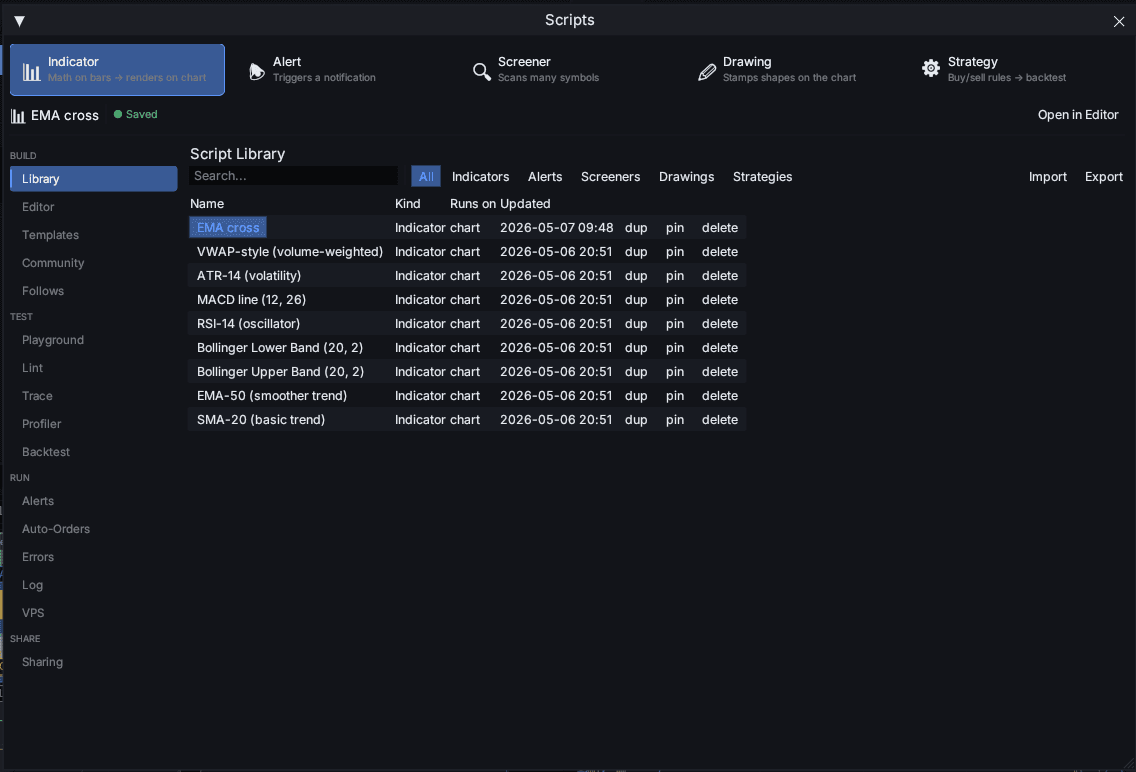
Spectra's scripting engine produces custom indicators, alerts, screeners, and strategies. The dashboard's scripts page groups them by kind, shows where each one runs (desktop or cloud), and tracks the last-edited timestamp so you never lose track of what's live.
- Grouped by kind: indicators, alerts, screeners, strategies, drawings
- Runs-on badge: desktop only vs cloud-executed
- Last-edited timestamp + visibility flag (private / published)
- Capacity bar against the tier's max_scripts cap
- Direct edit link back into the desktop / web script editor
07 · Plan & usage
Your tier, your limits, your renewal — in one card
The plan page shows your current tier (Free / Pro / Enterprise) with the renewal date, a per-limit usage bar for every cap (charts, alerts, scripts, workspaces, orders / month), and the full tier-comparison table so an upgrade decision takes one glance.
- Tier badge, renewal date, billing portal link
- Per-limit usage bars: charts, alerts, scripts, workspaces, orders/month, emails/day
- Live tier-comparison table (admin-editable, never out of date)
- Per-user overrides surfaced when an admin has granted a bump
- Invoices section (downloads + receipts)
08 · Webhook auto-orders
Webhook → Spectra → your broker — receipts on every fill
Wire any webhook source — your own server, a screener, a script — into Spectra and the cloud broker signs the payload, dedupes it, rate-limits you, and fires the order against your active account. The auto-orders page shows every webhook-triggered order in a live table — created time, exchange, symbol, side, qty, fill price, status.
- Live table of every webhook-triggered order
- Status pills: pending / filled / rejected / cancelled
- Signature verification + replay-protection visible per webhook
- Daily loss cap and rate limits configurable per webhook
- Direct link to the webhook editor (signature, secret, allowed payloads)
09 · Settings
Profile, language, theme, security — and your data
Tabbed settings hub: profile (display name + email + timezone), language picker (English, Arabic with full RTL, Spanish, French, German), security (password change), theme selection (every desktop theme), and an account tab with one-click data export and the danger zone.
- Profile: display name, email, timezone
- Language picker — five locales, Arabic in full RTL
- Theme selection mirrored from the desktop palette
- Password change with current-password confirmation
- Export your data (Pro tier feature)
- Danger zone: account deletion with two-click confirmation
One sign-in. Every surface that matters.
Spectra's dashboard isn't an afterthought — it's where the work shows up between the entries. Sign in to see the journal you'll wish you'd been keeping for years.